Friday, 14 September 2012

What's new in 7.4.12 (August 22)


New Features:


1. Now Xtreme WMS allows users to set the Base UOM of an item and specify larger UOMs that are based on it. Therefore, users can monitor inventory balances and inventory movement base on different UOM of an item. There are several settings need to be changed before applying Base UOM in various transactions. Please note that Base UOM is configurable at item basis. By default, all items added are not applying Base UOM unless users activate them manually.

(a) In order to activate Base UOM of a particular item, users firstly have to set [Applied Base UOM] in Customer Profile to "YES".


(b) Secondly, users are required to tick on the check box and select one of the UOM as Base UOM.


(c) While assigning a customer to this "Base UOM enabled" item, please ensure that the assigned customer's Base UOM is activated; otherwise it will prompt error below:


(d) If users want to check inventory balances and inventory movements in other UOM, they have to specify the desired UOM in [Item Profile] > [Record] > [Default] > [UOM Code: Receive] or [UOM Code: Issue].


(e) System will calculate the converted quantity for other larger UOM base on record added in [Item UOM Conversion].


(f) After the setting of Base UOM has been done, users will find out there are two new columns appears in transaction modules which are [Base UOM Code] and [Base UOM Quantity] after selected a customer which is "Base UOM enabled".


(g) As an example in Receive module, whenever users insert an item with its Receive UOM "CTN", system will automatically look for its Base UOM and store its Base UOM Quantity after conversion. In case below, Base UOM Quantity = 13 * 6 = 78. This logic same applied to other modules such as ASN, Order, Issue, Transfer and Ownership Transfer.


(h) To monitor Inventory Balances and Inventory Movement in different UOM, please select an option in new added field [Show UOM].


(i) By default, system will retrieve inventory balances with default UOM.


(j) By selecting "Receive UOM" in the [Show UOM] field, system will re-calculate the quantity base on the specified Item UOM Conversion.


Fixed Bugs:


1. Error occurs when retrieving back-dated inventory balances.

Tuesday, 31 July 2012

Using RFID to track pallet movement

We have been doing research in using RFID to track pallet movement.

The objective of this project is to automatically track the movement of pallet in real-time.

We embedded 2 RFID inlay into each plastic pallet, we also installed RFID reader (Impinj) by the entrance of each room. The moment a pallet enter the room, the RFID reader read the ID of the pallet and "tells" the system it has entered this room in real-time via local area network.


IGLO RFID Test 2012-07-31 from Teng Yong on Vimeo.

Thursday, 7 June 2012

What's new in 7.3.12 (June 7)


New Features:


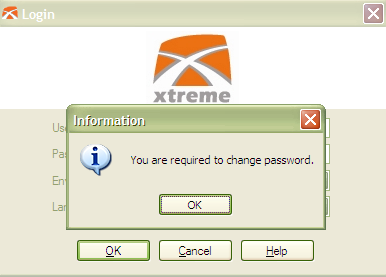
1. Users are enforced to change password after certain configurable interval and system applies Password Policy to enhance login security.


a) Interval setting of changing password can be found under Warehouse Parameters > General.


b) Whenever the date that users last updated password is greater than the interval (in above case, it's 90 days) compared to today's date, users will be requested to change password during their next login.


c) Password policy is applied in this latest version. The requirements are:
    - Password must contain at least one upper case alphabet, lower case alphabet and number in any position.
    - Password's length must between 5 to 20 characters.
   Example of acceptable password: abcDEF123 / 77aA88


2. Added feature to update information of Advanced Shipping Note (ASN) header in batch.

a) Feature can be found at ASN Browse > Function.


b) Fields that available for updating as shown below:


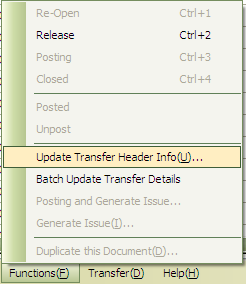
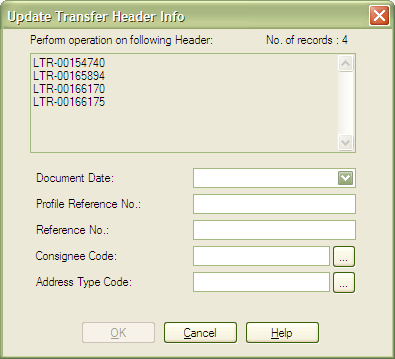
3. Added feature to update information of Transfer header in batch.

a) Feature can be found at Transfer Browse > Function


b) Fields that available for updating as shown below:


Fixed Bugs:


1. User preference cannot be saved in Order and Issue Apply module.

2. Error in show/hide columns in DataGridView.

3. Interface error when adding item detail in Receive, Order and Issue module.

Thursday, 14 April 2011

What's new in 7.3.11 (Apr 12 / Aug 23 / Sep 28)


New Features:


1. Added User Defined Fields in Details.

a) Firstly, users have to define customized field(s) in setting. (Setting > Data > User Defined Fields)


b) There is 7 columns in user defined fields settting.
i) Code
ii) Name
iii) Data Type
iv) Length
v) Mandatory (System will check whether data has been inserted for this field if Mandatory set to YES)
vi) Post To Bin Ledger (System will only recognize this field as filter criteria while doing allocation automatically or manually if set to YES)
vii) Description

c) If Data Type is Lookup, user have to setup Lookup Option.


d) After setup user defined field, users have to assign it into Customer Profile > User Defined Fields.


e) User defined field will only show in Detail for those assigned Customers.


f) Besides, user defined field is searchable in Search Wizard.


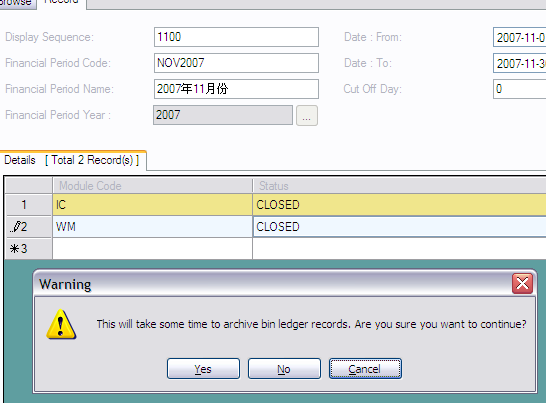
2. Archive Bin Ledgers for those calendar financial period code has been closed.

a) For the first time archive, user has to run the individual Archive Bin Ledger program.


b) Afterward, when users try to change the status of calendar financial period to CLOSED, system will prompt a confirmation dialog. If users confirm to proceed, system will move relevant bin ledger(s) to archived table.


c) And vice versa, when users reopen the calendar financial period, system will move relevant bin ledgers from archived table back to its origin.


3. Preview User Defined Report when mouse hover on Report Treenodes and it allow users to set visibility of preview depend on their account. For closing the preview image, user can just click on the image itself.


4. Added UI of [Add Detail] in Order and Issue detail module to help users insert detail with splitted quantity according to UOM Conversion Factor.

a) in EDIT mode, click on Add detail in tool strip menu at right top corner.


b) In below [Add Detail] screen, quantity will be split into different UOM based on UOM Conversion factor. Inserted UOM will be served as the lowest level and split the inserted quantity upwards according to the UOM hierarchy of the specified item.


c) Finally it will be split into 5 lines with different UOM for this example. Same applied to the Issue module.


5. Added [Container Details] tab in Receive Module to allow users insert container details into WMS for tracking purpose.


6. Added notification of pallet with multiple item SKU during posted in Order and Issue.


What's new in 7.2.11 (Feb 14 and Mar 24)


New Features:

1. Update Physical Pallet Count in Issue Header.


2. Order can generate multiple issues by customized UI.


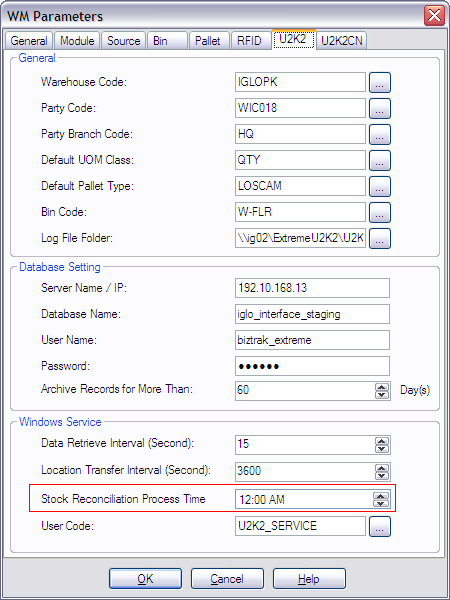
3. [U2K2] Export Stock Reconciliation which triggered by U2K2 Windows Service at specified time.


Enhancements:

1. Updated latest Xtreme Logo.


2. Users can customize font color for each column.


3. Calculate Production Date if Expiry Date inserted in detail.

4. Added contact info in Customer Profile Setting and Wizard.

[Customer Profile]

[New Customer Wizard]

5. Added filter criteria [Party Reference No.] in Issue Header Browse.


6. Added filter criteria [Profile Reference No.] in Transfer Header Browse.


7. [U2K2] Standardize ASN generates Receive UI


8. [U2K2] Posting is restricted if document date is not within current calendar financial period. For example, user posts a document dated as 20-March at April.


9. Added Calculation Expire Date By Month in Item Profile Setting.


10. WM Parameters added column of [Load Planning] in Module tab.


11. Item can be deleted if there is no transaction using it without prior to delete item sku and customer item first.

12. In Import ASN/Receive, system will calculate Date Expire and insert into detail if it is not provided.


Bugs Fixed:

1. Login UI shows logo in black background when Windows in XP Style Silver Theme.
2. Print Hitory Summary performs slow when changing to
tab.
3. List all item profiles should sorted by item code instead of item id.
4. Once header has been deleted, but data still showing in detail.
5. DataGridView using [Filter (F7)] will create UI problem.
6. If length of Remark exceeds 2000 characters, detele details will hit error.
7. Failure while saving detail in Calendar financial period when insert both header and detail data.
8. Address Line in Import Order/Issue has only 20 max length.
9. UI of New Customer Wizard not able to show error indication completely.
10. New Customer Wizard & Customer Profile should insert data into User Accessibility when saving new record.
11. Customer Profile not checking uniqueness of CODE when inserting new record.
12. Paste Customer Branch Code in Customer Item creates error branch IDs.
13. If "Variant" field of Item Profile is set to "No", we shouldn't allow user to create any variant code. If the "Variant field is set to "Yes", we have to force user to have at least one variant code before generate SKU.
14. Filter (Viewed) in Message Inbox and Outbox is not functioning when select "NO".
15. Data which allow Read-Only in Transfer detail can be edited.
16. Setting treeview will create error if select a node and drag it.
17. Duplicate document will fail if transaction has no tracking record involved.
18. Load Planning Generates Issue didn't deduct quantity in WM Bin Ledger Allocation table from [Balance_Quantity] to [Quantity_Entry].
19. In UI of ASN Generates Receive, append to existing Receive details not working.
20. Validation of start on and due date for Task.
21. Validation of Quantity/Measurement in Issue Wizard has been rectified as greater than zero instead of greater than one.
22. System will insert record of Non-tracking item into receive tracking during ASN Generates Receive.
23. Auto Allocation in Order/Issue/OT not involved filter criteria of [Date Production: To] and [Date Expire: To].
24. In Order/Issue, system hits error when click on Save button after key in data in list all details and remove unedited quantity.
25. In Order, change item type is allowed even detail already has apply.
26. Order and Bin Replenishment generates Transfer without data of Date Production: To, Date Expire: To and Lot No: To.
27. Insert data in Proof of Delivery manually doesn't capture inserted/updated user and datetime.
28. Consignee info is missing in Transfer header after Order Generated Picking.
29. Consignee Name in Customer Profile cannot be same.

Thursday, 30 September 2010

What's new in 7.1.10 (Aug 26 and 9.30)

Enhancements:-

1. Source code cannot be changed once a document is saved.

2. Added "Total Quantity" and "Sum" in "Batch Update Transfer Details"


3. "Transport Departure Datetime" is made to be a mandatory filed for Issue Module.

4. Additional blank space of Code and Name in Customer Branch will be trimmed before saved.

5. You can now have customized sequence of fields for Importing Item Profile


6. Able to duplicate more than one copy.


7. Prevent SQL Injection.

Bugs Fixed:-

1. Delete Issue Header was not recorded in Deletion Log
2. Search Wizard Deleted Document
3. Double Click on exclamation mark of Consignee and Supplier Profile Datagrid does not show filter criteria.
4. Import Issue does not import pallet no if pallet type value is blank.
5. There was an error message reads "Same customer item with different supplier must have same data for other columns" on saving customer item.
6. Can't add Address State to a Consignee Address record.
7. Error occurred when open up more than one "Import Item" screen.
8. [U2K2] Post duplicate line no under certain circumstances.
9. Error occurred whenever a user selects UOM class header and click on Record Tab.
10. Updating production date, expiry date or lot no value in Transfer Wizard doesn't go through validation process to ensure configuration comply to Item Profile.

Wednesday, 23 June 2010

What's new in 7.1.10 (June 23)

Enhancement:-
1. A new "Supplier" column is added into Customer Item. This is purely for reporting purpose and no business logic built-in to this feature.


2. Added a bar code field in Item Profile setting


3. Date field in Inventory Movement Screen has a checkbox.


4. You can now enter remark into ASN Header


5. You can select more Item Profile file to be imported at once.


6. Able to filter multiple value in DataGrid of "Setting". Below example show multiple value filter of Bin Profile.


7. User able to make changes to pallet no,lot no,production date and expiry date in Transfer module.

8. Performance improvement for Bin Ledger generate Issue.

9. User can now see the changes history of "Setting" record. Right Click on the left panel of DataGrid and Click on the menu "View Access Record".


10. [U2k2 CN] Add directory monitoring function to check if there is new files to be placed in a configured directory.

Bug Fixed:-

1. Transfer detail fields was still editable when the document was Release or Posted even though the changes cannot be committed.

2. Whenever a user editing content of "Shipment" tab of Issue module, an error message "String was not recognized as a valid datetime" if ETD is blank.

3. Unable to delete a newly created customer profile even though it has not been used.

4. Inventory Balance filter doesn't work according whenever a user try to filter by Party Code.

5. [U2K2]Import U2K2 Order function from File Import menu doesn't work correctly.