Friday, 14 February 2014

What's new in 8.1.14 (February 14)


New Features:


1. Transport Capacity

[Transport Capacity] has been added in Settings' Transport category. (Refer to Image 1.a)

Image 1.a

2. Request of Transport (ROT)

(a) ROT module can be found at the side menu under [Distribution] category. A short-cut key (Ctrl + Shift + Q) has been assigned to it. (Refer to Image 2.a)

Image 2.a

(b) Structure of ROT

Header of ROT consists of three tabs:
1) General : Includes information of Warehouse, Party, Branch, Document No., Document Date, Reference No. and Status. (Refer to Image 2.b)
2) User Defined Field: Includes four pre-set fields which are Goods Owner, Notify when Collect Return Pallet, ETA and Mode of Unloading / Loading. (Refer to Image 2.c)
3) Remark

Detail of ROT consists of two tabs:
1) Details: Users can keep track of the the size and quantity of transport capacity needed for distribution purpose. (Refer to Image 2.b)
2) Dispatch Note: Users can add or delete a dispatch note. (Refer to Image 2.d)

Image 2.b

Image 2.c

Image 2.d

(c) Assign Issue to ROT

A new header function [Assign to Request of Transport] can be found at Issue module. (Refer to Image 2.e) Selected Issue documents must have same warehouse, party and branch information in order to assign to ROT in batch. If some of the Issue documents in batch selection already assigned to another ROT , system will ignore them and assign the rest of it to the chosen ROT instead. (Refer to Image 2.f)

Image 2.e


Image 2.f

3. CDN renamed as Shipment

[Shipment] module (formerly known as CDN) can be found at Distribution category. (Refer to Image 3.a)

Image 3.a


Wednesday, 29 January 2014

Wednesday, 22 January 2014

If I have already an inventory management software, do I still need a warehouse management software?


In general, inventory management usually tells warehouse stakeholder the stock quantity or stock value in an entire warehouse or a large location.

Tracking Product up to detail bin location

In a nutshell, Warehouse Management Software (WMS) is a inventory management at micro level. You are often required to register the bin location of a particular product. Most of the time, it is not just the Item or Product code but also other essential information such as production batch number, expiry date, country of origin and etc.

By doing so, you can achieve :-
  1. FIFO/FEFO Picking (or any specific picking by criteria)
  2. Locating product more efficiently. Picking Slip or using handheld device to direct the order picker with picking route.
  3. Cycle counting (daily count by product, without WMS, locating product can be time consuming and less practical to do so)
Compared to using spreadsheet to record such information, a WMS should offer functionality such as producing product movement reports, you can tell exactly which product has been moved by which user with its timestamp. 

Aside from that, most WMS, designed for multi user environment which empower you with security access control which most spreadsheet program cannot offer.

Accuracy

Anyone who run a warehouse would agree that accuracy is high priority if not the top. How to capture information accurately and fast has becoming the key to success. Most WMS work with handheld computer with barcode scanning or RFID reader.

By scanning or reading the ID (whether it is product code, serial number or etc), it is up the business logic and software capability to match with what it suppose to be.

Leveraging on such technology can sometime improve the speed not by certain percentage but number of times.

Tuesday, 10 December 2013

What's new in 8.0.13 (December 10)


New Features:


1. Setting Access Audit

In earlier version of Xtreme, users can only trace back who is the person and time that make any changes of a particular record in Master Setting without knowing exactly what changes have been made.

(a) Therefore, Xtreme enhances this feature in latest release. Xtreme can now keep track of each changes in setting master file made by all users. Administrator or user has setting access right is required to decide which master setting amendment should be saved for future tracking purpose. (Refer to Image 1.a)

Image 1.a

(b) Let say if user makes changes to one of the item, he/she can review the changes by selecting the relevant item and right click to call out the Setting Access Record screen. (Refer to Image 1.b)

Image 1.b

(c) A new tab [Audit] can be found in Setting Access Record. This newly added tab shows the amended column and the comparison of old and new value. (Refer to Image 1.c)

Image 1.c

2. Setting Deletion Log

Whenever users drop a record in master setting, Xtreme will save the relevant deletion log automatically with information about the time and user performs deletion.

(a) Users can find the deletion log linkage at the top left of the Settings page. (Refer to Image 2.a)

Image 2.a

(b) There are several filter criteria in deletion log interface which are Category, Deleted By, Deleted Time:From and Deleted Time:To. Users must at least select which category of deletion record they want to trace while other criteria is optional. (Refer to Image 2.b)

Image 2.b

(c) Xtreme will show result according to the filter criteria once users click on [Show] button. Shown result includes information of time and user who drop the record and relevant detail based on the selected category. (Refer to Image 2.c)

Image 2.c

Wednesday, 16 October 2013

What's new in 7.9.13 (October 16)


New Features:


1. Print Report Control by Status

(a) Status control applies when user attempts to print report. For example, if [Tally Form] set as printable at OPEN status only, user unable to print it when the document in status other than OPEN. Below is the setting screen for [Print Report Control]. (Refer to Image 1.a)

Image 1.a

(b) When system denies user to print a report under status control, it prompts a warning message as below. (Refer to Image 1.b)

Image 1.b

2. License Control

(a) Xtreme WMS enhances the license key protection. In [Help > About] screen, [Expiry Date] and [Renew] button has been added in. (Refer to Image 2.a)

Image 2.a

(b) A license renewal screen will prompt when user clicks on [Renew] button. In order to extend Xtreme WMS license, user is required to retrieve the encrypted hardware information and send it to Xtreme Software. (Refer to Image 2.b)

Image 2.b

(c) Xtreme Software will generate a new license key based on the hardware information given and send back to user. User just need to paste the new license key and click on [Renew] button for license renewal. (Refer to Image 2.c)

Image 2.c

(d) License expiry date has been extended to one year later as compared to the expiry date shown in Image 2.a. (Refer to Image 2.d)

Image 2.d

3. User Defined Field is available at Customer Profile

(a) Other than transaction header and detail, User Defined Field now is available at Customer Profile. A new module type [Customer] has been added in the setting. (Refer to Image 3.a)

Image 3.a

(b) A new tab [User Defined Field] shows in Customer Profile and enables user to insert customized information accordingly. (Refer to Image 3.b)

Image 3.b

(c) User can search through the customer profile record by inserting [User Defined Field] as filter criteria. (Refer to Image 3.c)

Image 3.c

4. Dispatch Note Summary

(a) A new report [Dispatch Note Summary] has been added in Issue Module. (Refer to Image 4.a)

Image 4.a

(b) A window will prompt for choosing whether to show Base UOM on the report. (Refer to Image 4.b)

Image 4.b

(c) Sample of the dispatch note summary with display Base UOM. (Refer to Image 4.c)

Image 4.c


Monday, 22 July 2013

What's new in 7.8.13 (July 22)


New Features:


1. Item profile wizard and customer profile now can be found at Xtreme's sidebar.


2. Enhanced item profile wizard now allows user to create an item with following features:
    + create item with Base UOM
    + create multiple UOM code
    + create multiple Item UOM Conversion
    + create multiple Pallet Type Item


3. Enhanced customer profile wizard allows user to create a customer which apply Base UOM. User has option to proceed with adding new item after customer has been created.


4. User Defined Enquiry now provides user an option to select which database environment should the UDE be connected: either transaction database or pre-defined datamart.


Friday, 8 March 2013

What's new in 7.7.13 (March 8)


New Features:


1. [Pallet Docket No.] and [Pallet Quantity] added in CDN Header.


2. [Pallet Monitor] added in Warehouse Parameters. When this option set to YES, Pallet ID will be inserted during posting a Receive and it will be deleted during posting an Issue if the pallet is being fully applied.


3. [Pallet Lookup filtered by Customer] added in Warehouse Parameters. When this option set to YES, system will filter out the pallet list by specified customer whenever lookup a pallet in WMS.


4. [Delete Unused Pallet] added in Warehouse Parameters. When this option set to YES, system will delete unused pallet if no transaction found in ASN pallet and Receive detail.


5. [Allow Bin Ledger Archive] in Warehouse Parameters. When this option set to YES, system will archive bin ledger while changing the financial calendar period to CLOSED status.


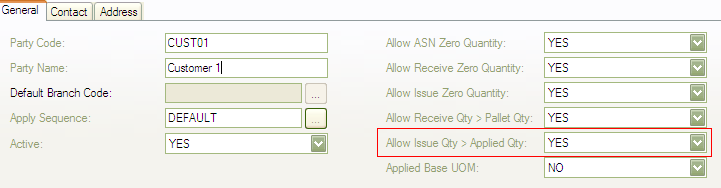
6. [Allow Issue Zero Quantity] added in Customer Profile. When this option set to YES, system will allow zero quantity inserted into Issue detail.


7. [Unit Price] and [Unit Cost] added in Customer Item. 


8. [Total Distinct Pallet Count] added in various transaction summary screen likes Receive, Order, Issue, Transfer, Ownership Transfer and Bin Ledger.


9. Added Shortcut key to Pallet Quantity (Ctrl+Shift+J) and Pallet Transfer (Ctrl+Shift+H).


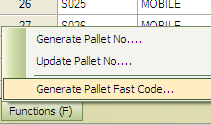
10. Added function of  [Generate Pallet Fast Code] in Pallet profile.


11. During release a Receive document, system will prompt user if the pallet is being used in another transaction.


Fixed Bugs:


1. Error when validating item variant in Bin Replenishment setting.

2. Error when validating item variant in Transfer Wizard.

3. Error of unable to select relevant bin code in Warehouse: To at Transfer.

4. Error of generating filter criteria for columns [Bin Code Criteria] / [Pallet Type Criteria] / [Pallet No. Criteria] in Order, Issue and Ownership Transfer.

5. Error of parameters will be duplicated during overwriting a user defined view.