Thursday, 7 May 2015

What's new in 8.5.15 (May 7)


New Features:


1. Added Container Details in Issue

Added [Container Details] tab in Issue Module to allow users insert container details into WMS for tracking purpose. (Please refer to Image 1.a)

Image 1.a

2. Added [Halal Certification Body] in Settings

Added [Halal Certification Body] setting for record management purpose. (Please refer to Image 2.a)

Image 2.a

3. Added [Item Halal Certification] in Item Profile

Added [Item Halal Certification] in Item Profile for record management purpose. (Please refer to Image 3.a)

Image 3.a


Thursday, 2 April 2015

What's new in 8.4.15 (April 2)


New Features:


1. Added access log of Customized Report and User-Defined Enquiry (UDE)

System administrator can keep track on the users access information of customized reports and user-defined enquiry (UDE). (Please refer to Image 1.a)

Image 1.a

2.  Amended Pallet Label where Bar-code font has been changed to [Code 128]

Thursday, 26 March 2015

What's new in 8.4.15 (March 26)


New Features:


1. Address Type Lookup changes address information

When users lookup address type in Order and Issue module, system will retrieve and show relevant address information such as address line, state, city, country, zip code and etc. (Please refer to Image 1.a)

Image 1.a

2. Added column [Total Quantity] in ASN report

Total Quantity is now available in Advanced Shipping Note report. (Please refer to Image 2.a)

Image 2.a

3. Export data from Data Grid View to file

The option of [Include column header] now is checked by default whenever users want to export information from data grid view to file.

Image 3.a

4. Added column [Remark] in Import ASN

A new column [Remark] has been added in Import ASN.


Friday, 13 February 2015

Customer Experience Optimization: How to Prevent Warehouse & Inventory Errors with Cloud Management

Customer experience can make or break your ecommerce business.

In fact, 89% of consumers have stopped doing business with an ecommerce company after a bad experience, and a customer is 4X more likely to buy from a competitor if the bad experience was service-related rather than price-related.

What’s more is that consumers are 2X more likely to share a bad experience online than they are a positive one. To account for that negative experience, it would take 12 positive reviews to convince readers that the one issue was resolved.

Continue to read from Big Commerce Blog (http://blog.bigcommerce.com/customer-experience-optimization-inventory/)

Friday, 23 January 2015

What's new in 8.4.15 (January 23)


New Features:


1. Added Bar code in Dispatch Note Summary

In order to facilitate the warehouse operation, bar code concept has been implemented in Dispatch Note Summary report. WMS encodes the Document No. into bar code with Code 128 symbology. (Please refer to Image 1.a)

Image 1.a

2. Added new report [Goods Return Note] in Receive

3. Added new report [Receive Adjustment] in Receive

4. Added new report [Supplier Return Note] in Issue

5. Added new report [Issue Adjustment] in Issue

6. New column [Consignee Group Name] in Lot No. Costing's Minimum Selling Price

A new column [Consignee Group Name] has been added in Lot No. Costing's minimum selling price. (Refer to Image 6.a)

Image 6.a


Tuesday, 6 January 2015

What's new in 8.3.15 (January 15)


New Features:


1. Attachment in main modules

A brand new attachment feature has been introduced in this latest version of WMS. Users can attach any type of file (ex: PDF, Image, Word Document, etc.) in WMS modules.

(a) First of all, users need to define the attachment folder for each module in Warehouse Parameters. (Refer to Image 1.a)

Image 1.a

(b) A new tab [Attachment] has been added in each module. (Refer to Image 1.b) If the selected record already has an attachment, the system will show an icon as an indication. (Refer to Image 1.c)

Image 1.b

Image 1.c

(c) Users can select files to attach in [EDIT] mode by just clicking on the attachment button. (Refer to Image 1.d)

Image 1.d

(d) Once the selection being done, the system will copy the attached file to the destination folder that pre-defined in Warehouse Parameters. At the meanwhile, the attached file will appear in the attachment tab. (Refer to Image 1.e)

Image 1.e

2. Serial No. Input Wizard

(a) A wizard has been added in Receive and Issue module to facilitate the process of using Serial No. in incoming and outgoing stock. This new wizard can be found at Receive Detail functions and Issue Apply functions respectively. (Refer to Image 2.a and Image 2.b)

Image 2.a

Image 2.b

(b) For Receive module,users just need to select an item and insert a series of serial no. in the wizard. It will generate receive details according to those inserted serial no. and each of them has 1 in quantity. (Refer Image 2.c and Image 2.d)

Image 2.c

Image 2.d

(c) For Issue module, users can manually allocate stock with desired serial no. by using the wizard. WMS will check the stock availability based on those serial no. automatically before apply stock. (Refer to Image 2.e and Image 2.f)

Image 2.e

Image 2.f

3. New column [Palletized] in Item Profile and Wizard

A new column [Palletized] has been added in Item Profile and Wizard. If its value set as [YES], the require of pallet type item setting is compulsory. (Refer to Image 3.a and Image 3.b)

Image 3.a

Image 3.b

4. New Zone Profile setting

Zone profile has been added in the setting. It mainly caters for categorizing consignee and sender in a different zone. (Refer to Image 4.a)

Image 4.a

5. Consignee Profile has a new facelift

(a) Consignee profile user interface has been re-designed to enhance record management experience. Consignee record is now searchable through various filter criteria such as code, name, zone, group and etc. Besides, it consolidates consignee address and consignee zone into one to facilitate the input process. (Refer to Image 5.a and Image 5.b)

Image 5.a

Image 5.b

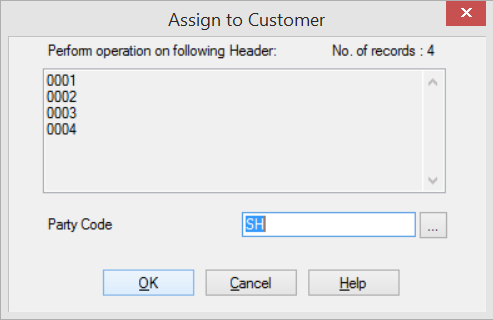
(b) Users can assign consignee to the customer by using the new function [Assign to Customer] at the right top corner of Consignee Profile. It will prompt a dialogue box for users to choose customer code. (Refer to Image 5.c and Image 5.d)

Image 5.c

Image 5.d

6. New Sender Profile setting

Sender profile has been added in the setting. It maintains sender basic information and also includes address and zone. (Refer to Image 6.a)

Image 6.a

7. New Salesperson Profile setting

Salesperson profile has been added in setting. (Refer to Image 7.a)

Image 7.a

8. New column [Term] in Customer Consignee

A new column [Term] has been added in Customer Consignee. (Refer to Image 8.a)

Image 8.a


9. New Report for Advanced Shipping Note

A new report has been added in Advanced Shipping Note. (Refer to Image 9.a)

Image 9.a


10. Consignment module

A new module has been added to maintain the consignment record.

11. Lot No. Costing module

A new module has been added to keep track the costing and selling price of products according to Lot No.

Tuesday, 7 October 2014

What's new in 8.2.14 (October 7)


New Features:


1. Check quantity variance between ASN and Receive

WMS will check quantity variance between ASN and generated Receive document during posting receive process. If there is any variance found, WMS provides an option to let user saves the information into Receive's Remark.  (Refer to Image 1.a and Image 1.b)

Image 1.a

Image 1.b

2. ASN Summary

A new summary screen has been added in Advanced Shipping Note (ASN) module.  (Refer to Image 2.a)

Image 2.a

3. Notify day to expiry when posting Issue

(a) In order for WMS to trigger this notification, user have to first set up the setting in Customer Item. (Refer to Image 3.a)

Image 3.a

(b) During posting Issue document, WMS compares expiry date of each selected records with the number of day(s) to notify setting in customer item. If any criteria matched, WMS prompts a dialogue form for user to choose whether still proceed to post even though selected record is nearly expired or already expired. (Refer to Image 3.b)

Image 3.b

4. Stocktake module

A new module has been added to facilitate the stocktake processes.


Fixed Bugs:


1. Error occurs in Update Issue Header Info.
2. Error occurs in filter source code in Request of Transport.